
Visual study tools
Photosynthesis Concept Map: Inputs, Stages and Study Questions
A photosynthesis concept map needs more than a leaf surrounded by keywords. Start with what enters and leaves each stage, then show how the stages connect. The example below gives you relationships to check against your own course.
Create a study diagramA worked visual example
Start with the scope of the map
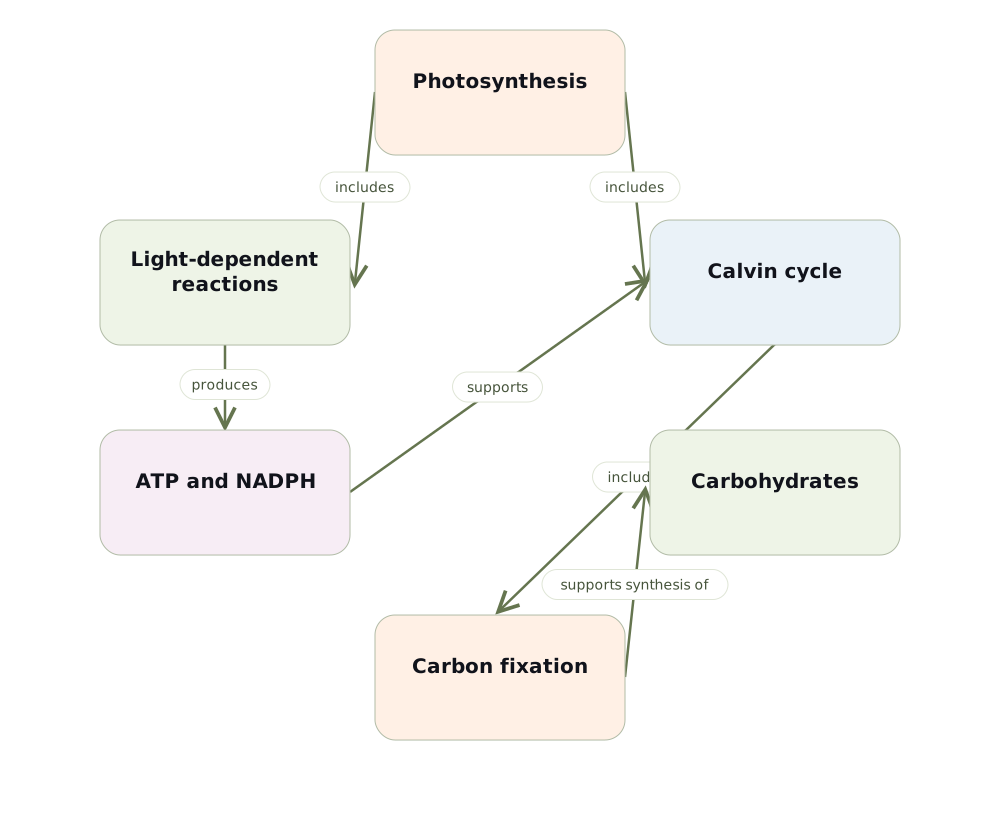
For a plant-cell lesson, use photosynthesis as the main concept and separate the light-dependent reactions from the Calvin cycle. Keep energy transfer distinct from the movement of matter. This example is a high-level learning scaffold; add the locations and intermediate molecules required by your own course.
Use precise links between the stages
Light-dependent reactions provide ATP and NADPH used in the Calvin cycle. The Calvin cycle incorporates carbon from carbon dioxide into organic molecules. Label the connection between the stages rather than drawing a single arrow that implies sunlight turns directly into glucose in one step.
Add inputs and locations as a second layer
After the main relationships are clear, add water, carbon dioxide and light energy to the relevant part of the map. For plant chloroplasts, distinguish the thylakoid membrane from the stroma. Keep oxygen release attached to the light-dependent reactions rather than treating it as a product of carbon fixation.
Use the map to find misconceptions
Try explaining why the Calvin cycle depends on the light-dependent reactions even though light is not its direct reactant. Then check whether your diagram incorrectly suggests that plants do not carry out cellular respiration. Treat an unclear arrow as a question to resolve using your textbook.
Test your understanding
- What do the light-dependent reactions supply to the Calvin cycle?
- Where should carbon dioxide enter the map?
Build a map from your own material
Choose Visualize in Memorizite before uploading your document. One generation uses one scan. Review the draft, edit its explanations and relationship labels, move cards and add relevant card images. Export a PDF of the full diagram when you want a study copy. The layout depends on your source; this guide does not promise an identical generated result.
Check the science
Use your assigned course source as the reference. For additional background, see the relevant OpenStax textbook chapter. This guide and its diagram are original study scaffolds, not reproductions of a textbook figure.
Check the relationships before studying
Create a study diagram