
Visual study tools
Concept Map vs Mind Map: Differences and Study Examples
Need a chapter overview or an explanation of how its ideas connect? That is the useful difference in a concept map vs mind map comparison. See both structures applied to study tasks before deciding which one to draw.
Create a study diagramA worked visual example
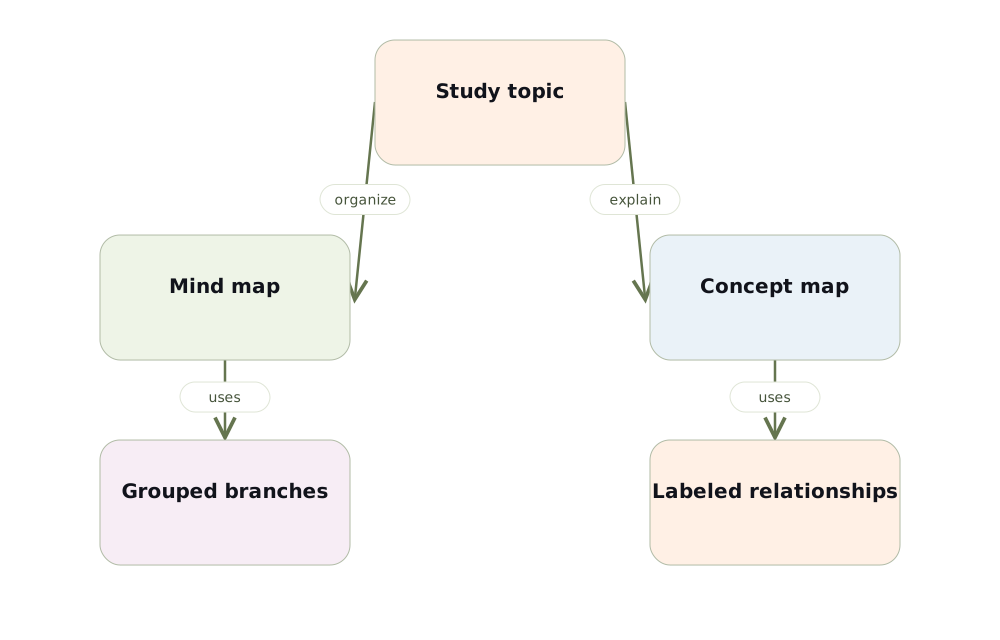
The central difference is what the connections mean
In a mind map, a branch usually indicates that an idea belongs under a larger topic. In a concept map, the connection has a specific meaning such as contains, influences or requires. Concept maps can have cross-links between branches when the source supports them. A circle of boxes alone does not establish those relationships.
A side-by-side cell biology example
For a mind map, put “cell” in the center and group membrane, nucleus and mitochondria as structures. For a concept map, connect the cell to its membrane with “is bounded by,” then connect the membrane to transport with “regulates.” The first view provides an overview; the second asks you to explain a relationship.
When to use each map
Choose a mind map when starting a chapter, grouping vocabulary or planning the topics you need to revise. Choose a concept map when you must explain mechanisms, distinguish similar ideas or connect definitions with conditions. You can begin with the overview and then build a more precise map for one difficult branch.
Avoid the common mapping mistakes
Do not label every connection “related to.” Do not mistake a sequence for proof of causation. Keep examples distinct from general rules and avoid drawing a link just because two words appear on the same page. Check direction and qualifiers against the course material before turning the map into practice questions.
Test your understanding
- Does this branch show a category or a specific relationship?
- Would a cross-link clarify the explanation?
Build a map from your own material
Choose Visualize in Memorizite before uploading your document. One generation uses one scan. Review the draft, edit its explanations and relationship labels, move cards and add relevant card images. Export a PDF of the full diagram when you want a study copy. The layout depends on your source; this guide does not promise an identical generated result.
Check the relationships before studying
Create a study diagram